Read what’s on screen.
Capture a screen region and paste it. Windows OCR reads the text on your device; the text is translated into your chosen language.
OVERLAY TRANSLATION FOR WINDOWS
Understand on-screen text and prepare your reply in another language. Move your translation window wherever you need it, right beside your chat.
Interface and translation languages
FROM SCREEN TO CHAT
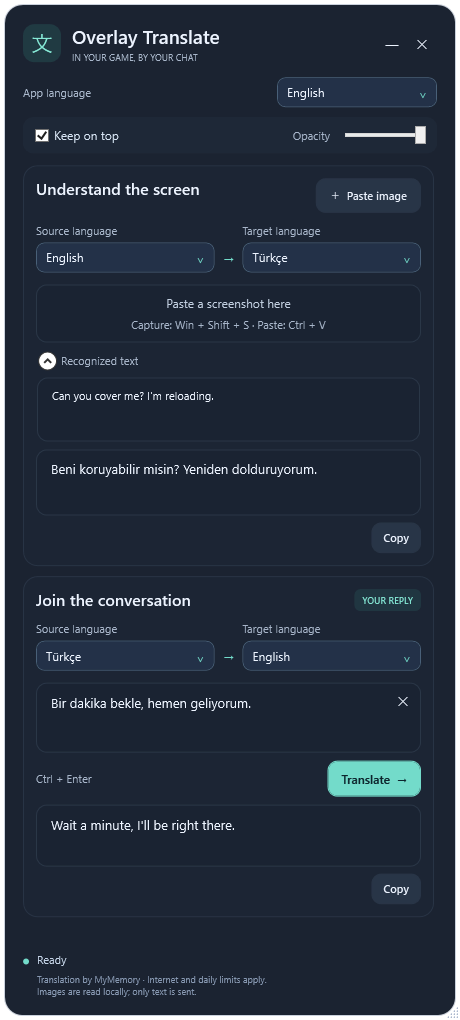
Paste a screenshot. Choose your source and target languages. Read the translation, prepare a reply, and copy it into your chat.
Capture a screen region and paste it. Windows OCR reads the text on your device; the text is translated into your chosen language.
Write a reply, translate it, and copy it with one click. Choose its source and target languages independently of image translation.
Drag, resize, adjust opacity, and keep it on top. The app remembers your window position and language choices.
Capture the text with Win + Shift + S. In the app, use Ctrl + V or the “Paste image” button.
Select the image’s source language and your target language. Check the detected text in the “Recognized text” section.
Write your reply and translate with Ctrl + Enter. Use “Copy” and paste the result into your game chat.
READY FOR YOUR GAME
Download the portable Windows package, extract the ZIP into a folder, and open the app.
Enable “Keep on top” and run the game in windowed or borderless windowed mode. The window may not appear in exclusive fullscreen or some anti-cheat environments. The app runs as a separate Windows window; it does not inject into your game.
Windows OCR reads the image locally on your device. The image itself is not sent. Recognized text and your reply are sent to the MyMemory translation service over HTTPS. An internet connection is required, and the free service has daily limits.
The Windows OCR pack for the image’s source language must be installed. The app tells you if it is missing. Install that language’s OCR feature under Windows Settings → Time & language → Language & region. Typed replies do not need an OCR pack.
No. Extract all ZIP files into one folder and open overlaytranslator.exe. The app uses Windows WPF and Windows PowerShell components. No account or API key is required.